How Python Handles Memory: A Simple Explanation for Beginners (2026)
Have you ever wondered what Python is doing “behind the scenes” when you write x = 10?
Or maybe your program started slowing down after processing a million rows of data — and you had no idea why?
Understanding how Python handles memory is one of those topics that separates developers who just write code from developers who write good code. You don’t need a computer science degree to get it. You just need the right explanation.
In this guide, you’ll learn:
- What actually happens when you create a variable
- How Python stores objects in memory
- What reference counting and garbage collection mean (in plain English)
- The difference between mutable and immutable objects and why it matters
- Common memory mistakes beginners make — and how to fix them
- How to profile and optimize memory in real Python projects
- What changed in Python 3.13 and 3.14 that affects memory management
Let’s start from scratch and build your understanding step by step.
What Happens When You Create a Variable in Python?
Most beginners think a variable is a “box” that holds a value — like a drawer labeled x that contains the number 10.
That’s not how Python works.
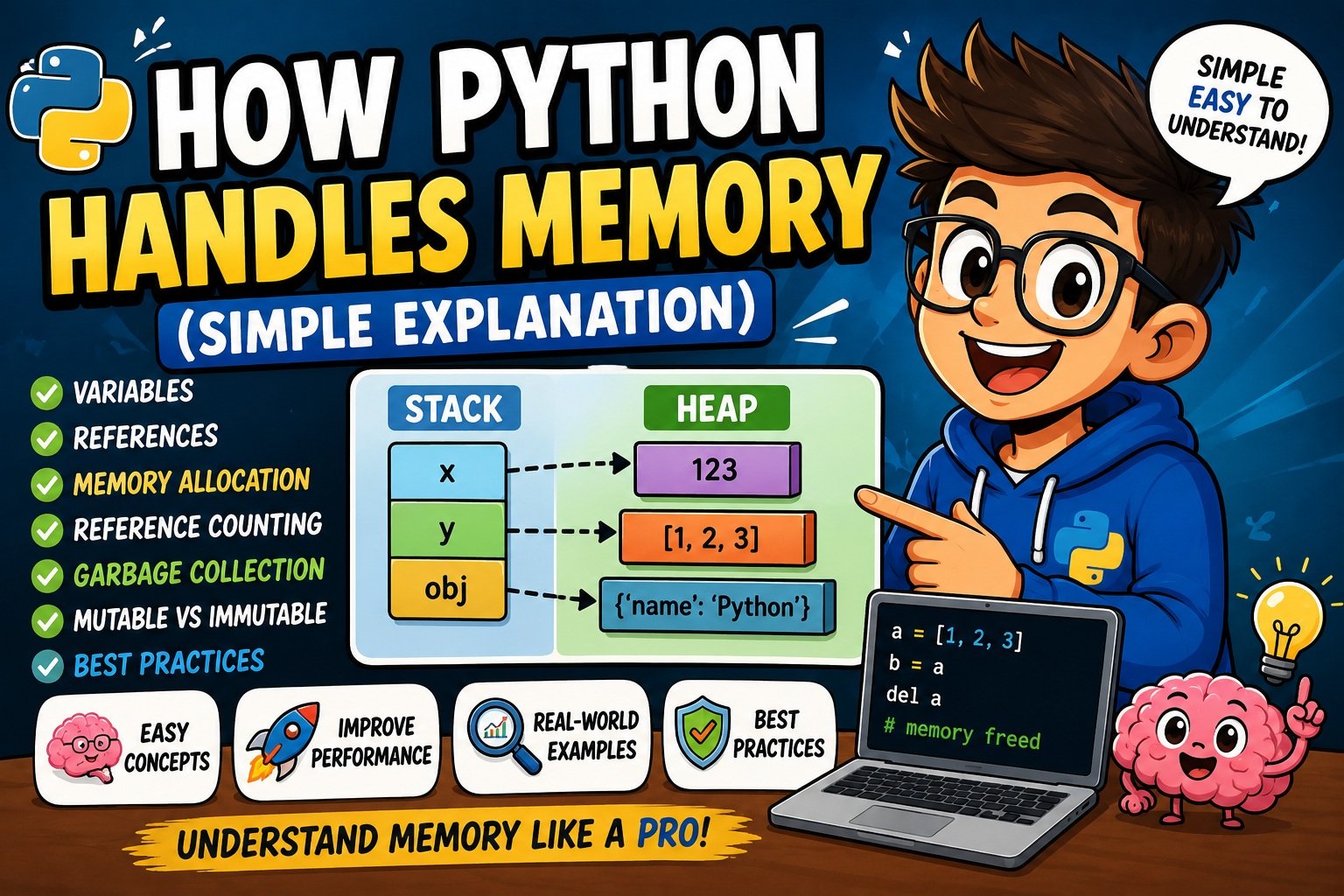
In Python, a variable is better described as a sticky label attached to an object. When you write:
x = 10Python does three things:
- Creates an object — an integer object with value
10is created in memory - Allocates space — the object is placed on the heap (more on this shortly)
- Creates a reference — the name
xis made to point at that object
The label x doesn’t contain 10. It refers to it.
Here’s why that matters:
x = 10
y = x

print(id(x))  # e.g., 140234567890
print(id(y))  # Same address!
Both x and y point to the same object in memory. You can verify this with the id() function, which returns the memory address of an object in CPython.
Small Integer Caching
Python’s CPython implementation caches small integers between -5 and 256. This means:
a = 5
b = 5
print(a is b)  # True — same object!

a = 1000
b = 1000
print(a is b)  # False — different objects
This is called integer interning, and it’s an optimization to avoid creating thousands of identical small objects. It can catch beginners off guard when using is instead of ==.
Key takeaway: In Python, variables are references to objects — not containers for values.
How Python Stores Objects in Memory
Every single Python object — whether it’s a number, a string, a list, or a class instance — is stored in memory with three essential pieces of information:
| Component | Description |
|---|---|
| Type pointer | What kind of object is this? (int, str, list, etc.) |
| Reference count | How many things are currently pointing to this object? |
| Value | The actual data |
This structure comes from CPython’s internal PyObject header — the base structure every Python object inherits at the C level.
Objects Are Bigger Than They Look
In C, an integer takes 4 bytes. In Python, even the simplest integer takes about 28 bytes:
import sys

print(sys.getsizeof(0))         # 28 bytes
print(sys.getsizeof("hello"))   # 54 bytes
print(sys.getsizeof([]))        # 56 bytes
print(sys.getsizeof({}))        # 64 bytes
That overhead exists because every Python object carries its type pointer, reference count, and value together. This is the cost of Python’s dynamic typing and automatic memory management.
Identity vs Value
Two objects can have the same value but be different objects in memory:
a = [1, 2, 3]
b = [1, 2, 3]

print(a == b)   # True  — same value
print(a is b)   # False — different objects
Use == to compare values. Use is to compare identity (same object in memory).
Stack vs Heap Memory in Python
When people talk about memory in programming, they usually mean two regions: the stack and the heap.
Here’s what each one does in Python:
| Feature | Stack | Heap |
|---|---|---|
| What’s stored | Function call frames, local variable names | All Python objects |
| Managed by | Python interpreter automatically | Python memory allocator (pymalloc) |
| Speed | Very fast | Slightly slower |
| Size | Small, fixed | Large (limited by available RAM) |
| Lifetime | Ends when the function returns | Until reference count reaches zero |
The Stack: Where Function Calls Live
When you call a function, Python creates a stack frame — a small record containing the function’s local variable names and the execution state. When the function returns, that frame is removed from the stack.
def greet(name):
    message = "Hello, " + name  # 'message' lives in this stack frame
    return message

greet("Alice")  # Stack frame created, then destroyed when function returns
The local variable message lives in the stack frame. But the actual string object it refers to? That lives on the heap.
The Heap: Where Objects Actually Live
Every Python object — every integer, string, list, dictionary, and class instance — is created on the heap. The heap is a large, dynamic region of memory.
Python doesn’t let you directly manage the heap. Instead, CPython uses its own private heap managed by an allocator called pymalloc.
Simple rule: Variable names live in the stack (inside function frames). The objects those names point to live on the heap.
Understanding References in Python
A reference is simply a pointer from a variable name to an object in memory.
The tricky part is that multiple variable names can point to the same object.
Shared References and Mutation
This behavior matters most with mutable objects like lists:
a = [1, 2, 3]
b = a           # b is a reference to the SAME list

b.append(4)

print(a)  # [1, 2, 3, 4] — a was also changed!
You didn’t copy the list. You just created a second label pointing to the same list. When b modifies it, a sees the change too.
To create a true independent copy:
import copy

a = [1, 2, 3]
b = copy.copy(a)       # Shallow copy
c = copy.deepcopy(a)   # Deep copy (safe for nested objects)

b.append(4)
print(a)  # [1, 2, 3] — unchanged
Use copy.copy() for flat structures. Use copy.deepcopy() when your object contains other objects (nested lists, dicts, etc.).
Weak References
A strong reference keeps an object alive. A weak reference does not.
The weakref module lets you hold a reference to an object without preventing it from being garbage collected:
import weakref

class MyClass:
    pass

obj = MyClass()
weak = weakref.ref(obj)

print(weak())  # The object
del obj
print(weak())  # None — object was garbage collected
Weak references are useful in caches — you want to keep an object around while it’s in use, but not force it to stay alive just because of the cache.
Reference Counting in Python
Reference counting is Python’s primary memory management mechanism — and it’s elegantly simple.
Every Python object maintains an internal counter: how many references point to it?
- When you assign an object to a variable → count goes up
- When a variable is deleted or reassigned → count goes down
- When the count reaches zero → the object is immediately deallocated
Watching Reference Counts
You can observe this with sys.getrefcount():
import sys

x = []
print(sys.getrefcount(x))  # 2 (x + the function argument itself)

y = x
print(sys.getrefcount(x))  # 3

del y
print(sys.getrefcount(x))  # 2
Note:
sys.getrefcount()always adds 1 temporary reference for the function call itself. So subtract 1 from what you see to get the “real” count.
When Does the Count Go Up?
- Assigning to a new variable:
y = x - Passing to a function:
print(x) - Appending to a list:
my_list.append(x) - Adding as a dictionary value:
d['key'] = x
When Does the Count Go Down?
- Using
del x - Variable goes out of scope (function returns)
- Variable is reassigned:
x = "something else" - Removed from a container:
my_list.remove(x)
The Problem: Circular References
Reference counting has one significant limitation: it cannot handle circular references.
a = {}
b = {}
a['ref'] = b
b['ref'] = a

del a, b
# Both objects still exist in memory!
# a's count is 1 (b references it)
# b's count is 1 (a references it)
# Neither ever reaches zero
These objects are unreachable — no code can use them — but their reference counts are stuck at 1. This is a memory leak under pure reference counting.
This is exactly why Python also has a garbage collector.
Python Garbage Collection Explained
Python uses a two-part memory management system:
- Reference counting — handles the majority of objects immediately
- Cyclic garbage collector — handles circular references that reference counting can’t resolve
The Cyclic Garbage Collector
CPython’s garbage collector (GC) periodically scans container objects — lists, dicts, sets, and class instances — looking for groups of objects that only reference each other and nothing else.
When it finds such a group, it breaks the cycle and frees the memory.
Importantly, the GC only tracks container objects. Simple scalars like integers and strings can’t form cycles, so the GC ignores them completely.
Three Generations: The Key to Efficiency
Python’s GC uses a generational approach, based on one insight: most objects die young.
Generation 0  →  New objects (collected most often)
Generation 1  →  Survived one collection
Generation 2  →  Long-lived objects (collected rarely)
When the number of new objects exceeds a threshold (default: 700), Generation 0 is collected. Objects that survive are promoted to Generation 1, and so on.
Default thresholds:
import gc
print(gc.get_threshold())  # (700, 10, 10)
This means: collect Generation 0 after 700 allocations, collect Generation 1 after 10 Generation 0 collections, and so on.
Working with the gc Module
import gc

# Check how many objects are tracked per generation
print(gc.get_count())  # e.g., (312, 4, 1)

# Manually trigger garbage collection
gc.collect()

# Disable GC during performance-critical sections
gc.disable()
# ... intensive work ...
gc.collect()   # Clean up manually
gc.enable()
Python 3.14 Update: Incremental GC
Python 3.14 introduced an improved incremental garbage collector that scans memory in small bursts across generations, rather than in one large stop-the-world pause. This reduces latency spikes in applications where consistent response time matters — and it’s particularly important for free-threaded (GIL-disabled) builds.
Mutable vs Immutable Objects and Memory Usage
This distinction has a direct impact on how memory is allocated and shared.
| Object Type | Mutable? | Memory Behavior |
|---|---|---|
int | No | New object created for each new value |
float | No | New object created for each new value |
str | No | New string created for each modification |
tuple | No | Fixed in memory; safe to share across references |
frozenset | No | Fixed in memory |
list | Yes | Modified in place; same memory address |
dict | Yes | Modified in place |
set | Yes | Modified in place |
Why Strings Feel Like They Change
s = "hello"
s = s + " world"
This doesn’t modify the original string. It creates a new string object "hello world" and makes s point to it. The original "hello" object either gets freed (if nothing else references it) or stays in memory if it was interned.
Tuples Are More Memory-Efficient Than Lists
import sys

print(sys.getsizeof((1, 2, 3)))  # 64 bytes
print(sys.getsizeof([1, 2, 3]))  # 88 bytes
Tuples are smaller and faster because Python knows their size will never change. Use tuples for fixed collections of data that don’t need to be modified.
String Interning
Python automatically interns (reuses) short strings, especially those that look like identifiers:
a = "hello"
b = "hello"
print(a is b)  # True — same object (interned)

a = "hello world"  # Contains a space, may not be interned
b = "hello world"
print(a is b)  # May be False
You can also manually intern strings with sys.intern() — useful when you’re storing the same string thousands of times:
import sys
word = sys.intern("frequently_repeated_word")
How CPython Manages Memory Internally
CPython doesn’t call malloc() from the OS for every tiny Python object. That would be extremely slow. Instead, it uses a layered architecture.
CPython’s 4-Layer Memory Architecture
Layer 4: Object-Specific Allocators (e.g., int cache, dict freelist)
Layer 3: pymalloc (small object allocator, objects < 512 bytes)
Layer 2: Python Raw Allocator (thin wrapper around C malloc/free)
Layer 1: OS (malloc/free, mmap)
pymalloc: The Small-Object Specialist
Almost all Python objects are small. pymalloc is optimized specifically for this reality.
It works in three levels:
- Arena (256 KB): A large chunk of memory requested from the OS
- Pool (4 KB): Sub-divided from an arena; holds objects of one size class
- Block: A single slot within a pool; holds one object
When you create a small object, Python grabs a pre-allocated block from a pool — no OS call needed. This is dramatically faster than calling malloc() each time.
When a block is freed, it goes back into the pool for reuse — Python doesn’t necessarily return memory to the OS immediately. This is why your Python process’s memory usage as reported by the OS can appear high even after deleting large objects.
Object Pools and Freelists
CPython maintains freelists — pre-allocated pools of empty objects ready to use — for common types like integers, dicts, and lists. When you delete a dict, it often goes back into a freelist rather than being truly freed.
This makes creating and destroying common objects very fast.
The GIL and Memory
The Global Interpreter Lock (GIL) is a mutex in CPython that ensures only one thread executes Python bytecode at a time. One of its original purposes was to make reference counting thread-safe — without it, two threads could simultaneously modify an object’s reference count, causing corruption.
Free-Threading in Python 3.13 and 3.14
Python 3.13 (October 2024) introduced free-threaded builds — CPython compiled without the GIL. Python 3.14 (October 2025) matured this significantly.
Key changes for memory management:
- The
pymallocallocator is replaced bymimalloc(developed by Microsoft), which is thread-safe and allows parallel memory allocation - Reference counts are split into
ob_ref_localandob_ref_sharedto reduce contention between threads - A new incremental GC prevents latency spikes in concurrent applications
For most developers in 2026, standard Python with the GIL is still the default. Free-threading is opt-in and best suited for CPU-bound parallel workloads. That said, it’s the direction Python is heading.
Common Memory Mistakes Beginners Make
These are the mistakes that show up again and again in code reviews and debugging sessions.
Mistake 1: Circular References Without Realizing It
This often happens in tree structures or linked lists:
class Node:
    def __init__(self, value):
        self.value = value
        self.parent = None
        self.children = []
When a child holds a reference to its parent and the parent holds a list of children, you have a cycle. The GC handles this, but it creates unnecessary GC pressure.
Fix: Use weakref.ref for back-references (parent pointer):
import weakref

class Node:
    def __init__(self, value):
        self.value = value
        self._parent = None
        self.children = []

    @property
    def parent(self):
        return self._parent() if self._parent else None

    @parent.setter
    def parent(self, node):
        self._parent = weakref.ref(node) if node else None
Mistake 2: Storing Everything in a Global List
results = []

def process(item):
    results.append(transform(item))  # Every result stays in memory forever
If you process millions of items, results grows without bound.
Fix: Use a generator or process in chunks and write results to disk or a database.
Mistake 3: Not Using Context Managers for Files
# Bad
f = open("data.txt")
data = f.read()
# If an error occurs, f is never closed

# Good
with open("data.txt") as f:
    data = f.read()
# Always closed, even if an exception occurs
Open file handles hold references to buffers in memory. Always use with statements when reading and writing files in Python.
Mistake 4: Mutable Default Arguments
This is one of Python’s most infamous gotchas:
# Bad — the list is created ONCE and reused across all calls
def add_item(item, lst=[]):
    lst.append(item)
    return lst

print(add_item(1))   # [1]
print(add_item(2))   # [1, 2] — surprise!

# Good
def add_item(item, lst=None):
    if lst is None:
        lst = []
    lst.append(item)
    return lst
Mistake 5: Thinking del Immediately Frees Memory
x = [1, 2, 3, 4, 5]
del x
# The list object may still be in a freelist, not returned to the OS
del removes the reference. The object is freed when its reference count hits zero. But “freed by Python” doesn’t always mean “returned to the OS immediately.”
Mistake 6: Unbounded lru_cache
from functools import lru_cache

# Bad — cache grows forever
@lru_cache(maxsize=None)
def expensive(n):
    return n * n

# Good — limit the cache size
@lru_cache(maxsize=1000)
def expensive(n):
    return n * n
If expensive() is called with millions of different inputs, an unbounded cache becomes a memory leak. If you’re unfamiliar with how decorators work, our guide to Python decorators covers the fundamentals.
Mistake 7: Loading Entire Large Files into Memory
# Bad
with open("huge_log.txt") as f:
    lines = f.readlines()  # All 2GB loaded into RAM

# Good
with open("huge_log.txt") as f:
    for line in f:          # One line at a time
        process(line)
Memory Optimization Techniques
1. Use Generators Instead of Lists
A generator produces values one at a time and doesn’t hold them all in memory:
# List — holds 1,000,000 integers in RAM
squares = [x**2 for x in range(1_000_000)]

# Generator — computes one value at a time, near-zero memory
squares = (x**2 for x in range(1_000_000))

total = sum(squares)  # Works perfectly
For a deep dive on this topic, see our guide on Python generators vs iterators.
2. Use __slots__ for Data-Heavy Classes
Every Python class instance has a __dict__ by default — a dictionary storing its attributes. For classes where you create millions of instances, this is expensive.
__slots__ replaces the instance dictionary with a lean, fixed structure:
# Without __slots__
class Point:
    def __init__(self, x, y):
        self.x = x
        self.y = y

# With __slots__
class PointSlots:
    __slots__ = ['x', 'y']
    def __init__(self, x, y):
        self.x = x
        self.y = y

import sys
p1 = Point(1, 2)
p2 = PointSlots(1, 2)
print(sys.getsizeof(p1.__dict__))  # 232 bytes (the dict alone!)
print(sys.getsizeof(p2))           # 56 bytes
__slots__ can reduce per-instance memory by 40–60%. It’s particularly valuable in object-oriented Python when creating thousands or millions of instances.
3. Use Tuples for Fixed Data
Already covered — but worth repeating: if your collection of data won’t change, use a tuple. It’s smaller and Python can optimize it more aggressively.
4. Choose the Right Data Structures
For large numeric datasets, don’t use plain Python lists:
import sys, array

py_list = [i for i in range(1000)]
arr = array.array('i', range(1000))  # Type-coded array

print(sys.getsizeof(py_list))  # ~8,056 bytes
print(sys.getsizeof(arr))      # ~4,064 bytes
For even better performance, NumPy arrays use 4–8 bytes per element versus 28+ bytes for Python integers.
5. Chunk Large Files
import pandas as pd

# Bad — loads entire 5GB file
df = pd.read_csv("huge_dataset.csv")

# Good — processes in chunks
for chunk in pd.read_csv("huge_dataset.csv", chunksize=10_000):
    process(chunk)
For more on working efficiently with large datasets, see our Pandas tutorial for beginners.
6. Use weakref for Caches
import weakref

cache = weakref.WeakValueDictionary()

def get_object(key):
    obj = cache.get(key)
    if obj is None:
        obj = create_expensive_object(key)
        cache[key] = obj
    return obj
Objects in a WeakValueDictionary are automatically removed when nothing else references them — no memory leak.
7. Tune the Garbage Collector for Batch Processing
import gc

# Disable during a memory-intensive loop
gc.disable()

results = []
for i in range(1_000_000):
    results.append(process(i))

# Re-enable and collect manually
gc.enable()
gc.collect()
Disabling the GC during tight loops eliminates GC overhead mid-loop. Collect manually when you’re done.
Real-World Examples
Example 1: Log File Processor
Problem: A script reads a 2GB log file and stores every line in a list for analysis. It crashes with MemoryError.
Before:
with open("server.log") as f:
    lines = f.readlines()  # 2GB in RAM

for line in lines:
    if "ERROR" in line:
        process_error(line)
After:
with open("server.log") as f:
    for line in f:  # One line at a time
        if "ERROR" in line:
            process_error(line)
Memory usage drops from ~2GB to effectively zero, because only one line exists in memory at any moment.
Example 2: Data Analysis Pipeline
Problem: Loading a 10GB CSV fully into a Pandas DataFrame crashes on a machine with 8GB RAM.
After (chunked processing):
import pandas as pd

results = []

for chunk in pd.read_csv("large_data.csv", chunksize=50_000):
    # Process each chunk independently
    summary = chunk.groupby("category")["value"].sum()
    results.append(summary)

final = pd.concat(results).groupby(level=0).sum()
Example 3: Web Scraper with Memory Growth
Problem: A scraper stores every scraped page in memory, eventually running out of RAM after thousands of pages.
Solution:
def scrape_and_save(urls):
    for url in urls:  # urls is a generator, not a list
        page_data = fetch(url)
        save_to_database(page_data)  # Write immediately, don't accumulate
        # page_data goes out of scope here → reference count → 0 → freed
Example 4: Class with Many Instances
Problem: A simulation creates 5 million Particle objects and runs out of memory.
Solution: Add __slots__:
class Particle:
    __slots__ = ['x', 'y', 'z', 'mass', 'velocity']

    def __init__(self, x, y, z, mass, velocity):
        self.x, self.y, self.z = x, y, z
        self.mass = mass
        self.velocity = velocity
With 5 million instances, this alone saves gigabytes of memory.
Memory Profiling Tools
Don’t guess where your memory is going. Measure first.
Tool 1: tracemalloc (Built-in, Recommended for Production)
Available since Python 3.4. No installation needed.
import tracemalloc

tracemalloc.start()

# ... your code ...

snapshot = tracemalloc.take_snapshot()
top_stats = snapshot.statistics('lineno')

print("Top 5 memory consumers:")
for stat in top_stats[:5]:
    print(stat)
Take two snapshots and compare them to find memory leaks:
snapshot1 = tracemalloc.take_snapshot()
run_workload()
snapshot2 = tracemalloc.take_snapshot()

top_stats = snapshot2.compare_to(snapshot1, 'lineno')
for stat in top_stats[:3]:
    print(stat)
As of 2026, tracemalloc has improved stack trace accuracy and operates with less than 1% overhead under normal production load.
Tool 2: memory_profiler
Great for development. Provides line-by-line memory analysis.
# Install: pip install memory-profiler

from memory_profiler import profile

@profile
def my_function():
    a = [1] * 1_000_000
    b = [2] * 2_000_000
    del a
    return b
Tool 3: memray (Recommended for Identifying Hotspots)
Developed by Bloomberg. Captures all allocations including those from C extensions — something tracemalloc can’t do. Generates rich visual reports and flame graphs.
pip install memray
memray run my_script.py
memray flamegraph my_script.bin
memray adds less than 5% overhead, compared to 20%+ for some alternatives. Requires Python 3.8+; works on Linux and macOS (Windows support is experimental as of 2026).
Tool 4: objgraph
Answers the question: “Why isn’t this object being freed?”
import objgraph

objgraph.show_most_common_types(limit=10)
objgraph.show_backrefs(my_object, max_depth=3)
Recommended Profiling Workflow (2026)
| Step | Tool | Purpose |
|---|---|---|
| 1. Detect | memray | Find which functions consume the most memory |
| 2. Pinpoint | tracemalloc | Find exact lines allocating memory |
| 3. Diagnose | objgraph | Understand why objects aren’t being freed |
| 4. Monitor | psutil | Track RSS memory in production with alerts |
Best Practices for Python Memory Management (2026)
1. Measure Before You Optimize
Never assume where memory is going. Profile first with tracemalloc or memray, then optimize the actual bottleneck.
2. Prefer Generators for Large Data
Default to generators when processing sequences. Only convert to a list when you genuinely need random access or multiple iterations.
3. Always Use Context Managers for Resources
with statements guarantee that file handles, database connections, and network sockets are released — even when exceptions occur.
4. Use __slots__ for Data-Heavy Classes
If you create thousands or millions of instances of a class, add __slots__. The memory savings are substantial.
5. Avoid Mutable Default Arguments
Always use None as a default argument and create the mutable object inside the function body.
6. Cap Your Caches
Every @lru_cache, @cache, or manual dictionary cache should have a maximum size. Unbounded caches are deferred memory leaks.
7. Use weakref for Back-References and Caches
Whenever you have objects that reference their parents, or caches that shouldn’t keep objects alive artificially, use weakref.
8. Chunk Large I/O Operations
Read large files line by line. Process large datasets in chunks. Never load more into memory than you need at one time.
9. Keep Up with Python Version Changes
Python 3.13 and 3.14 introduced significant memory management changes (free-threading, mimalloc, incremental GC). If you upgrade Python versions, re-profile your memory-sensitive code.
10. Add Memory Regression Tests to Your CI/CD Pipeline
Use tracemalloc snapshots in your test suite to detect memory regressions before they reach production.
Python Memory Management Interview Questions
These are questions that come up regularly in Python developer interviews. For a broader set of questions, see our Top 20 Python Interview Questions for Beginners.
Q1: What is reference counting in Python?
A: Reference counting is Python’s primary memory management method. Every object maintains an internal counter of how many references point to it. When the count reaches zero, the object’s memory is freed immediately. You can inspect reference counts with sys.getrefcount().
Q2: What is a circular reference and how does Python handle it?
A: A circular reference occurs when two or more objects reference each other, creating a loop that prevents their reference counts from ever reaching zero. Python’s cyclic garbage collector periodically scans container objects to detect and break these cycles.
Q3: Explain Python’s generational garbage collector.
A: Python organizes objects into three generations. New objects start in Generation 0 and are collected most frequently. Objects that survive a collection are promoted to Generation 1, then Generation 2. This works because most objects are short-lived, so focusing collection effort on Generation 0 is efficient.
Q4: What is the difference between del x and garbage collection?
A: del x removes one reference to an object, decrementing its reference count by 1. If the count reaches zero, the object is freed immediately — that’s reference counting, not garbage collection. Garbage collection specifically refers to the cyclic GC that handles circular references.
Q5: What is pymalloc?
A: pymalloc is CPython’s custom memory allocator for small objects (under 512 bytes). It pre-allocates large memory blocks (arenas) from the OS and sub-divides them into pools and blocks, making small allocations much faster than repeated malloc() calls.
Q6: What are __slots__ and how do they improve memory efficiency?
A: By default, Python class instances store attributes in a __dict__ (a dictionary). Defining __slots__ replaces this with a fixed, lean structure, eliminating the overhead of the instance dictionary. This can reduce per-instance memory by 40–60%.
Q7: What is the difference between a shallow copy and a deep copy?
A: A shallow copy (copy.copy()) creates a new container object but the elements inside still reference the same objects as the original. A deep copy (copy.deepcopy()) recursively copies all nested objects, creating a fully independent duplicate.
Q8: What is the GIL and how does it relate to Python memory?
A: The Global Interpreter Lock (GIL) is a mutex in CPython that ensures only one thread executes Python bytecode at a time. It was originally implemented to make reference counting thread-safe without needing per-object locks. Python 3.13 made the GIL optional; Python 3.14 introduced a thread-safe mimalloc-based allocator for free-threaded builds.
Q9: How would you find a memory leak in a Python application?
A: Start with tracemalloc to take two snapshots before and after a suspected leaking operation, then compare them to find which lines are allocating memory that isn’t being freed. Use objgraph to visualize what’s holding references to surviving objects. In production, use memray for a detailed allocation report.
Q10: Why does Python use more memory than C for simple data types?
A: Every Python object includes a type pointer, a reference count, and a value — even a simple integer takes ~28 bytes compared to 4 bytes in C. This overhead is the cost of Python’s dynamic typing, automatic memory management, and runtime flexibility.
Frequently Asked Questions
Q: Does Python automatically manage memory?
Yes. Python uses reference counting and a cyclic garbage collector to automatically allocate and free memory. You never need to call malloc() or free(). However, understanding how it works helps you write more efficient code and avoid subtle memory leaks.
Q: How do I check how much memory a Python object uses?
Use sys.getsizeof() for a shallow measurement of a single object. For a full recursive size (including all nested objects), you’ll need a helper function or the pympler library’s asizeof().
Q: Can I force Python to free memory immediately?
You can call gc.collect() to trigger the cyclic garbage collector manually. But CPython may keep freed memory in internal freelists rather than returning it to the OS immediately. For the OS to reclaim memory, the entire arena must be empty.
Q: What is string interning in Python?
String interning means Python reuses the same string object for strings with identical content, rather than creating new objects each time. CPython automatically interns short strings that look like identifiers. You can manually intern strings with sys.intern().
Q: Is Python’s memory management suitable for large-scale applications?
Yes, with proper care. Use generators, __slots__, chunked I/O, bounded caches, and weakref where appropriate. Profile with tracemalloc or memray. Many large-scale production systems — including data pipelines, web servers, and ML inference services — run Python successfully.
Q: What happens when Python runs out of memory?
Python raises a MemoryError exception. Unlike a crash, this is catchable, but in practice it usually means you need to reduce memory usage — through chunking, generators, or more efficient data structures.
Q: What is the difference between is and == in Python?
== compares values. is compares identity — whether two names point to the exact same object in memory. Never use is to compare values like integers or strings, unless you specifically need identity (e.g., if x is None).
Q: Does Python’s garbage collector slow down my program?
The GC adds some overhead. For most programs, this is unnoticeable. For performance-critical batch processing loops, you can gc.disable() before the loop and gc.collect() after. Always measure the impact before and after — don’t disable the GC without profiling.
Q: What changed in Python 3.13 and 3.14 for memory management?
Python 3.13 introduced optional free-threaded builds (GIL can be disabled). Python 3.14 matured this with a mimalloc-based thread-safe allocator and an incremental garbage collector that reduces latency spikes. For most developers, the standard GIL-enabled build is still the default.
Q: How do I avoid memory leaks in Python?
Use context managers (with) for resources, avoid circular references (or use weakref), cap all caches with maxsize, avoid storing large collections in global scope, and profile regularly with tracemalloc.
Conclusion
Python’s memory management is sophisticated, but once you understand the core ideas, it becomes intuitive.
Here are the key takeaways:
- Variables are references, not containers. Multiple variable names can point to the same object.
- Reference counting is Python’s primary tool — it frees most objects immediately when they’re no longer needed.
- The cyclic garbage collector handles what reference counting can’t: circular references between container objects.
- All Python objects live on the heap. Variable names live in stack frames.
- Immutable objects are often shared and cached. Mutable objects are shared by reference — modifying one reference affects all.
- CPython’s
pymallocmakes small-object allocation fast through arenas, pools, and blocks. - Python 3.13/3.14 introduced free-threading with a new thread-safe allocator — the biggest architectural change in Python’s memory management in decades.
- Generators,
__slots__, chunked I/O, andweakrefare your primary tools for memory optimization. - Profile before you optimize. Use
tracemalloc→memray→objgraphto find real problems.
Memory issues in Python are almost always fixable once you know where to look. Run tracemalloc on your own code today — you might be surprised what you find.
Recommended Resources
| Resource | Why It’s Useful |
|---|---|
| Python Memory Management — Official Docs | The authoritative source on CPython’s memory architecture, including allocator layers and the private heap |
| gc — Garbage Collector Interface | Complete reference for the gc module: thresholds, callbacks, generations, and manual collection |
| tracemalloc — Trace Memory Allocations | Official documentation for Python’s built-in memory tracing tool, with examples for snapshots and comparisons |
| Python Data Model — Objects, Values, and Types | Explains the Python object model: identity, value, type, and mutability at the language spec level |
| PEP 703 — Making the GIL Optional | The proposal behind Python 3.13’s free-threading feature, explaining the design decisions that affect memory management in modern Python |